Job application business process
Last updated: September 24, 2025
The Job Application Business Process is the series of activities necessary to complete recruiting in Workday. It begins after a Position (PN) and Job Requisition (REQ) have been created (via the “Create Job Requisition” Business Process), and ends when a candidate is Ready for Hire (leading into the “Hire Employee” Business Process).
Most Workday BPs are linear, meaning they move through a sequence of steps in a uniform sequence. The Job Application BP is dynamic, providing flexibility so steps may happen concurrently, be repeated, or occasionally happen in an atypical order. For example, if a candidate renegotiates their offer, they may be in the background check stage and the offer stage of the BP at the same time.
Stages and steps
The typical Job Application BP includes seven stages, many of which have steps (sub-processes) that can occur sequentially or concurrently as noted below. The Job Application BP is a path followed for each candidate for a job; it begins when a candidate applies for an open position and ends when that candidate withdraws, is declined, or is forwarded to the Hire BP.
1. Review
A candidate has applied for an open position and Recruiting Office Partners determine if that candidate (here called an “applicant”) is eligible for employment and meets the minimum qualifications to hold the position.
- Only Recruiting Office Partners and UTemp Office Partners can view applicants and candidate profiles that are at the Review stage.
- Applicants stay in Review until they are declined, withdraw, or moved forward to “Screen”.
2. Screen
Managers and Delegates (i.e. those with the Hiring Manager, Hiring Manager Override, Hiring Manager Delegate, or HR Partner security role) view, sort, decline, withdraw, or move forward applicants to their Requisition that are eligible for employment and meet the minimum qualifications for that position.
- Applicants can be moved forward from Screen to Interview, Reference Check, or Offer.
- Campus Applicants: Receive the Criminal History Disclosure task when they are moved from Review to Screen.
- Recruiting Office Partners and UTemp Office Partners are also able to view, decline, or move forward candidates at this, or any, stage or step.
3. Interview
Managers and Delegates have selected candidates that meet the additional requirements for a position and may have the desired qualifications, and they want to interview.
Note: Interviews and interview-specific communications are conducted outside of Workday.
- Managers and delegate roles can view candidates and decline, withdraw or forward applicants.
- Applicants can be moved forward from Interview to Screen, Reference Check, or Offer stages.
- Managers and delegate roles can share candidates in the Interview stage with employees that have been assigned the UW Interviewer ad hoc security role.
- The ad hoc role can be assigned during the Review, Screen or Interview stages.
- After being assigned the security role, UW Interviewers can view details of applicants forwarded to the Interview stage.
- Campus Applicants: If they have not already completed the task, they will receive the Criminal History Disclosure task when they are moved from Screen to Interview.
4. Reference check
Managers and Delegates have selected candidates that have demonstrated continued qualifications through a live interview and are ready to check references for those candidates.
- Managers and delegate roles can view candidates and decline, withdraw or forward applicants.
- Applicants can be moved forward from Reference Check to Interview or Offer stages.
- UW Medicine and UTemp Managers can review references’ responses within Workday.
- Campus Applicants (internal and external: If they have not already completed the task, they will receive the Criminal History Disclosure task when they are moved from Interview to Reference Check.
5. Offer
Managers or delegates have selected a candidate(s) to whom they wish to extend a job offer.
The Offer stage is largely sequential, not concurrent, and it’s important to note that Managers and Delegates must not extend a verbal offer until the Recruiting Office Partner and Compensation Office Partner (when required) have approved the proposed offer details in Workday.
- Managers and Delegates initiate the Offer stage by moving a candidate to the “Initial Offer” step.
- Managers and Delegates confirm they have requested review of current and former UW employee’s personnel files and, when required by a collective bargaining agreement, that they have interviewed the required number of represented candidates.
- Recruiting Office Partners will review all salary offers.
- Compensation Office Partners will review all proposed offers for professional staff positions Grade 11 and higher, offers that are outside of the UW pay range for the job profile, and those exceeding the salary threshold for UW Medicine.
- After receiving UWHR approvals, the Manager or delegate extends the verbal offer outside of Workday.
- To propose a renegotiated offer amount, the Manger or Delegate forward the candidate to the “Revise Offer” step.
- The Manager or a designee submits the verbal offer decision in Workday after the offer is accepted or declined (i.e. candidate withdraws).
- External Applicants complete the Sexual Misconduct Declaration (SMD) in the Offer stage. Recruiting Office Partners cannot approve a job offer until the candidate’s SMD has been cleared.
- External Applicants submit their Personal Information and Government Identifiers to populate their Workday prehire and prepare for their background check (if required).
6. Background check
Managers and delegates have indicated that the selected candidate(s) have accepted their verbal offer, and the Recruiting Office Partner then initiates the background check. The following steps must be completed sequentially:
- The Recruiting Office Partner initiates the HireRight background check via Workday.
- The candidate (if external) logs into HireRight to verify their personal information and provide their residency history.
- The Recruiting Office Partner reviews and verifies background check results.
7. Ready for hire
The Recruiting Office Partner has verified the background check results and makes sure that the candidate’s data is cleared for use in the Employee Hire Business Process. The following steps must be completed sequentially:
- The Recruiting Office Partner verifies that the hire details are complete and match what was entered during the Offer Stage.
- The Recruiting Office Partner verifies that the compensation details are complete and match what was entered during the Offer Stage by entering a required comment in the BP history.
- The requisition is unposted / removed from its posting in the UW Jobs Site(s) (an automatic action)
- The candidates remaining in the Review and Screen states are declined (an automatic Workday action that triggers after one week)
How to track the status of a candidate’s job application
The instructions below will help you track communications sent to the candidate and their application activities. To track hiring activities completed by and pending action from UW employees, please see Managing the Progress of a Business Process.
1. Open the Candidate Profile for the candidate whose application you want to track.
2. Navigate to the onscreen card that contains the timeline.
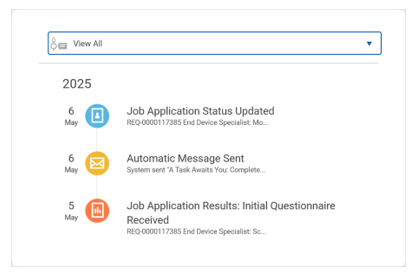
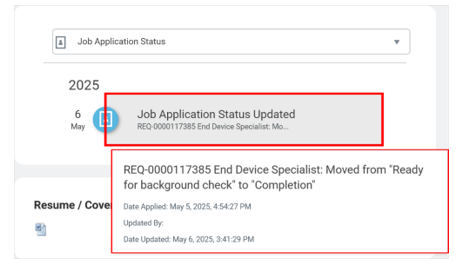
3. Expand the collapsible menu within that card, then select Job Application Status.

4. Select the most recent timeline item of the application you wish to track to expand application status details.