Time tracking job aid – compensatory time off
Table of Contents
Last updated: November 14, 2025
This job aid applies to campus FLSA non-exempt salaried staff and serves to inform employees and their time and absence initiates about how to designate and view time blocks marked to accrue Compensatory Time Off in lieu of straight time or overtime compensation.
Accrual
FLSA non-exempt salaried staff can accrue Compensatory Time Off instead of receiving overtime pay with prior supervisor approval in accordance with the terms of their employment program or collective bargaining agreement.
Requesting compensatory time off in Workday
Overview
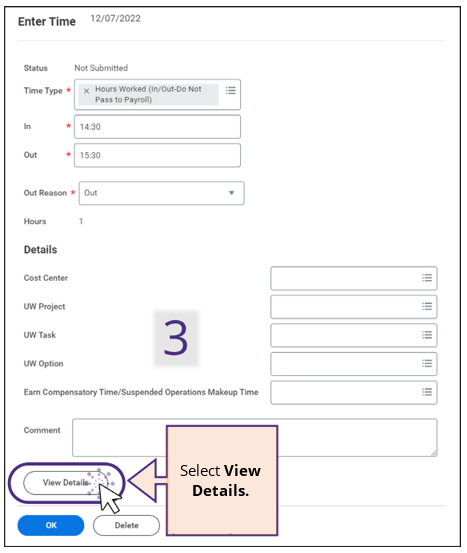
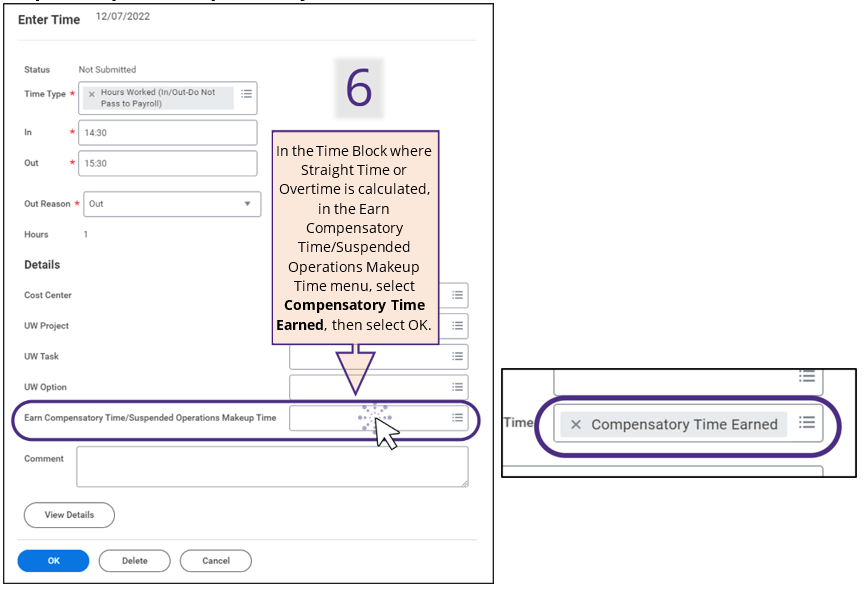
To trigger the accrual of Compensatory Time Off, the Employee or Time and Absence Initiate must select the Compensatory Time Earned worktag in the time block(s) where the timesheet has calculated and added a Compensatory Time eligible Time Calculation Tag, such as Straight Time or Overtime, for the employee. Workday will then adjust the Time Calculation Tag to reflect Compensatory Time Earned.
If a Compensatory Time Earned worktag is added to a time block that does not generate Straight Time or Overtime, no Time Calculation Tag changes will occur and no Comp Time will accrue.
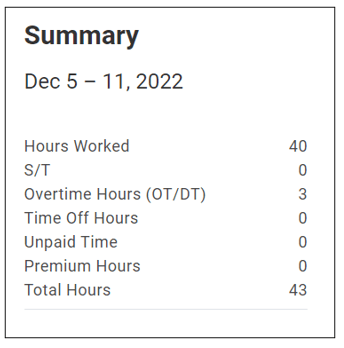
Straight Time Pay vs. Overtime Pay – What’s the Difference? Straight-Time (ST) pay (regular rate of pay) is paid to all part-time, overtime-eligible employees when they work beyond their regular daily and/or weekly schedule up to 40 hours in a week to ensure they are paid for their hours worked.
Overtime (OT) pay (1.5 times one’s regular rate of pay) is paid for hours worked in excess of 40 hours in a workweek (or over daily scheduled hours under certain collective bargaining agreements) and applies to both full- and part-time overtime-eligible employees.
Process
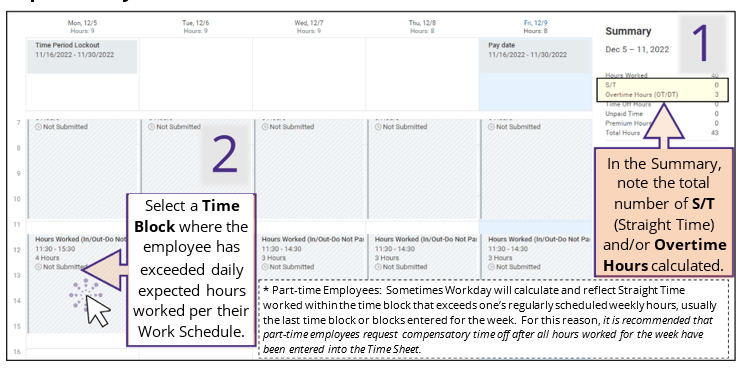
Step 1: Verify OT/ ST Calculations
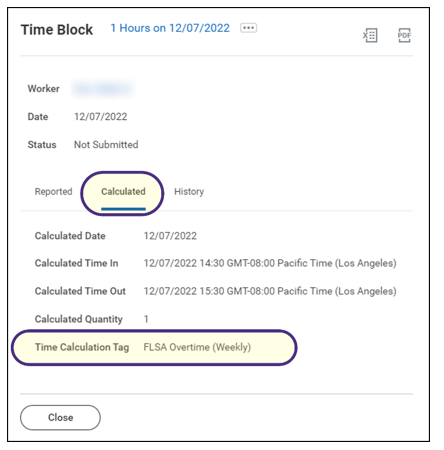
Time Calculation Tags – What’s the Difference? Below are common Compensatory Time Earned eligible Time Calculation Tags; other similar tags may also be eligible.
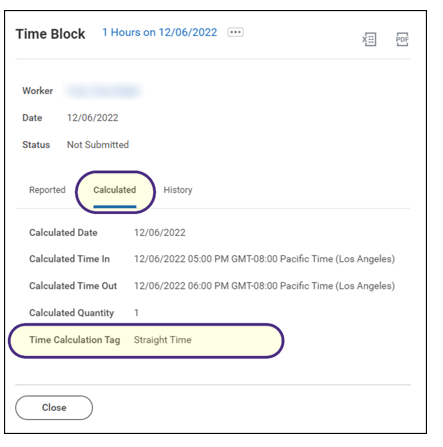
Straight Time – appears for part-time, overtime eligible employees for time worked beyond daily and weekly expected hours per their Work Schedule up until 40 hours.
Daily Contract Overtime (1.5) – appears for eligible full-time, overtime eligible employee who has not yet entered 40 hours worked for the week on their Time Sheet but has entered time worked beyond daily expected hours per their Work Schedule.
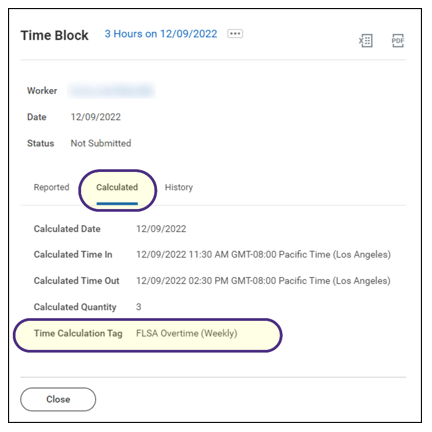
FLSA Overtime (Weekly) – appears when any overtime eligible employee (part-time or full-time) works over 40 hours in a workweek.
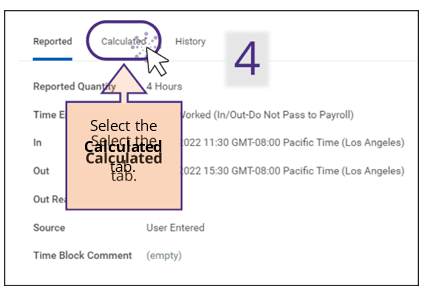
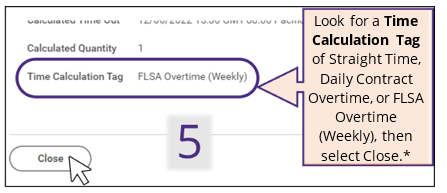
Step 2: Request Compensatory Time Off
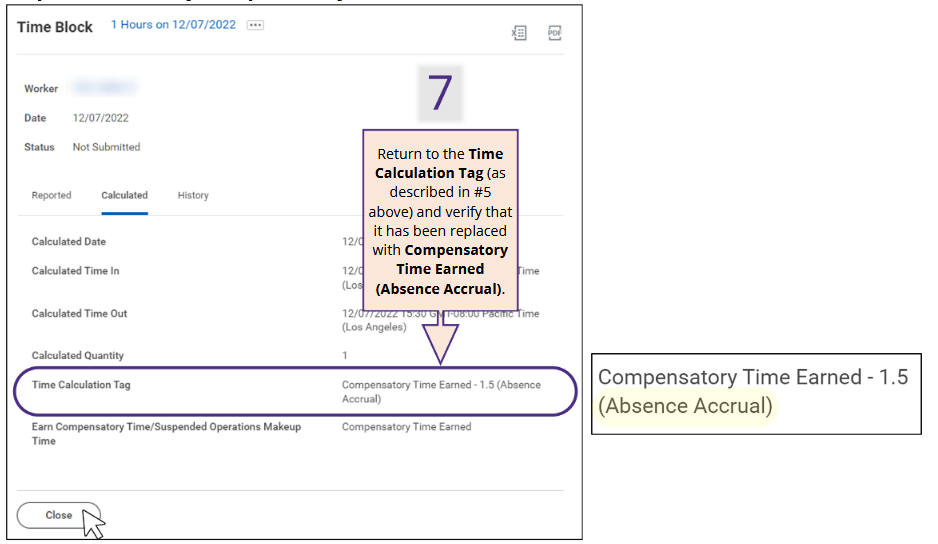
Step 3: View/Verify Compensatory Time Calculation
Time calculation tag examples
Following are common Compensatory Time Earned eligible Time Calculation Tags; other similar tags may also be eligible.
Part-time Employee
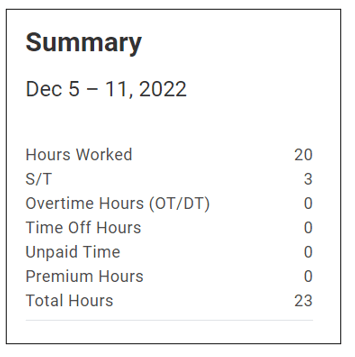
Straight Time (ST) Earned:
(NE S SEIU 925 Non Supv), 50% FTE
50-5C4-MonTueWedThuFri Worked 10a-2p M-F
Worked one additional hour M, T, & W resulting in 3 hours Straight Time earned
Part-time Employee
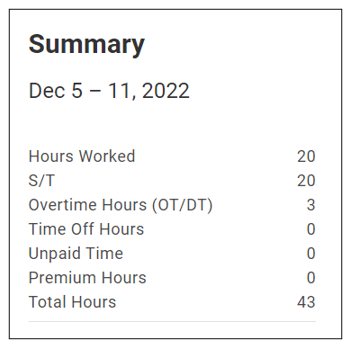
Overtime and ST Earned:
(NE S SEIU 925 Non Supv), 50% FTE
50-5C4-MonTueWedThuFri
Worked 8a-4:30p (w/ ½ hour lunch), M-F resulting in 20 hours Straight Time earned
Worked one additional hour M, T, & W resulting in 3 hours Overtime earned
Full-time Employee (has not yet entered all time worked for the week)
Daily Contract Overtime (1.5) Earned:
(NE S SEIU 925 Non Supv), 100% FTE
100-5C4-MonTueWedThuFri Worked 8a-4:30p (w/ ½ hour lunch), M-W
Worked one additional hour M, T, & W
resulting in 3 hours Overtime earned
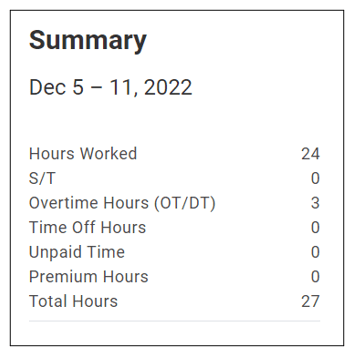
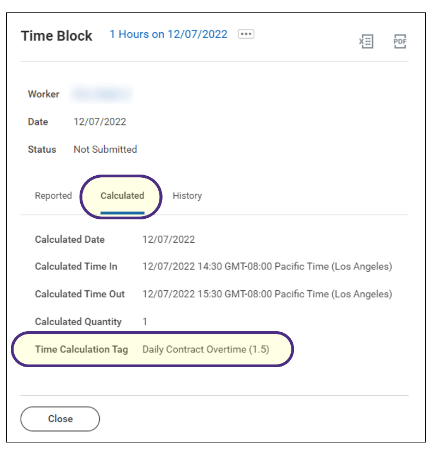
Note: In this example that the employee has NOT yet entered all time worked for the week into their Time Sheet. Once they enter all time worked for the week, the Daily Contract OT will transition to FLSA Weekly OT.
Full-time Employee (has entered all time worked for the week)
FLSA Overtime (Weekly) Earned:
(NE S SEIU 925 Non Supv), 100% FTE
100-5C4-MonTueWedThuFri
Worked 8a-4:30p (w/ ½ hour lunch), M-F
Worked one additional hour M, T, & W resulting in 3 hours Overtime earned